

Pending Requests View
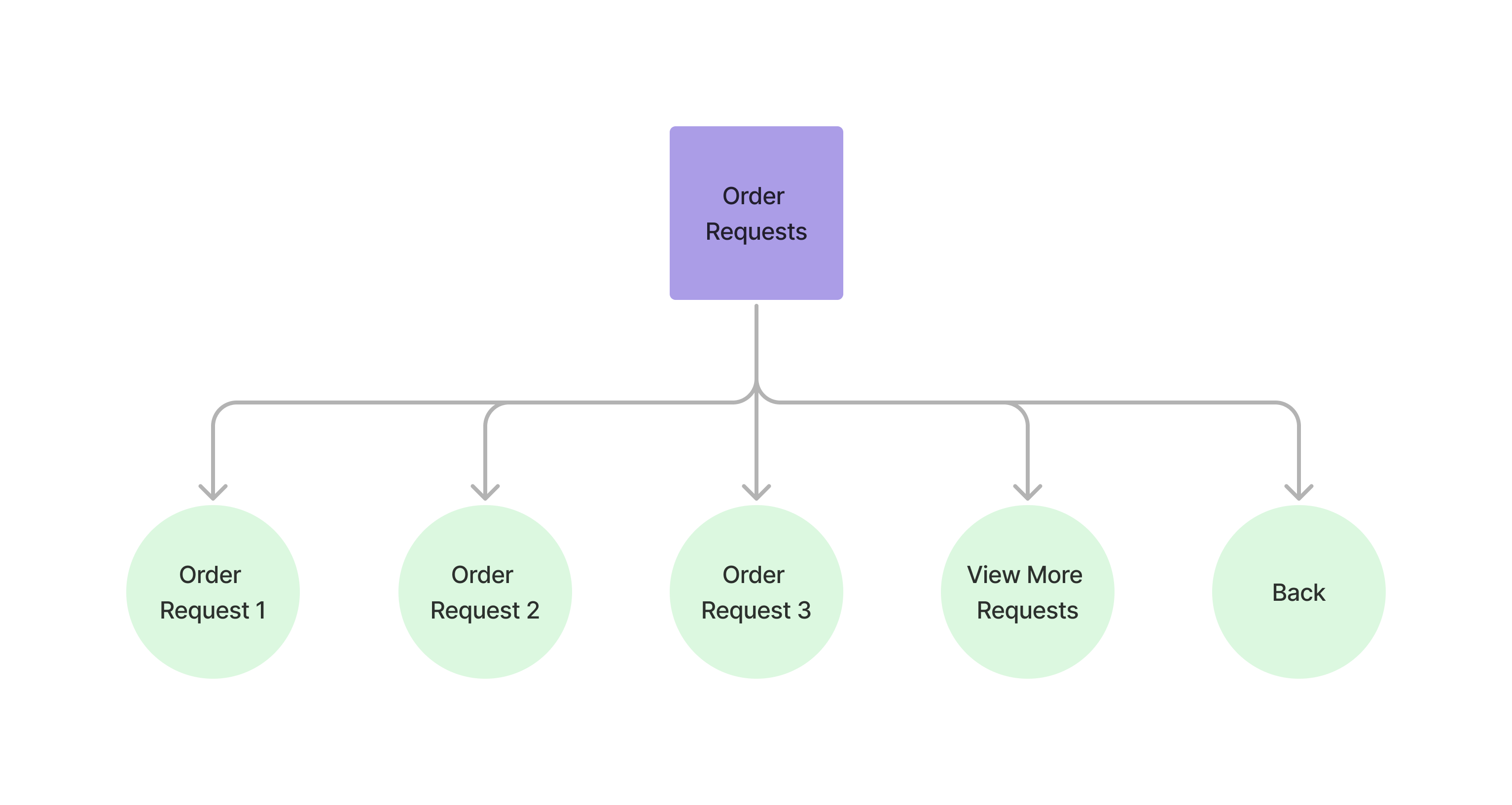
The requests menu view allows users to view the current pending requests.
Accessing the Pending Requests View
Section titled “Accessing the Pending Requests View” curl --request POST \ --url https://api.staging.pipevest.com/v1/ussd/process \ --header 'Content-Type: application/json' \ --header 'Authorization: Bearer <access-token>' \ --header 'x-client-id: <client-id>' \ --data '{"sessionId": "<session-id>", "choice": "2"}'Example Response
{ "message": "USSD request processed successfully", "data": { "sessionId": "ussd_2231df057f1f8f5269f0a268249ac104", "currentState": "PENDING_REQUESTS", "menu": { "state": "PENDING_REQUESTS", "text": "Pending requests", "options": [ { "key": "1", "label": "SELL AAPL ZK281.51", "nextState": "PENDING_REQUEST_DETAILS", "data": { "orderId": "cmhnivxqq0009s60162e8kj64", "orderType": "SELL", "symbol": "AAPL", "amount": 281.51, "status": "PENDING", "createdAt": "2025-11-06T14:29:15.027Z" } }, { "key": "2", "label": "BUY TSLA ZK562.00", "nextState": "PENDING_REQUEST_DETAILS", "data": { "orderId": "cmhniqac40007s601oc2xei0v", "orderType": "BUY", "symbol": "TSLA", "amount": 562, "status": "PENDING", "createdAt": "2025-11-06T14:24:51.412Z" } }, { "key": "0", "label": "Back", "nextState": "MY_PORTFOLIO" } ], "isEndState": false }, "ussdText": "Pending requests\n\n1. SELL AAPL ZK281.51\n2. BUY TSLA ZK562.00\n0. Back", "expiresAt": "2025-11-10T14:56:05.356Z" }}Pending requests 1. SELL AAPL ZK281.51 2. BUY TSLA ZK562.00 0. Back
When the customer has no open orders the screen reads Pending requests /
None. with 0. Back as the only option.
Paging requests view
Section titled “Paging requests view”The list shows 4 requests per page. When there is more than one page the
heading states the range — Pending requests 1-4 of 9 — and the navigation keys
appear: 6 for previous, 7 for next.
curl --request POST \ --url https://api.staging.pipevest.com/v1/ussd/process \ --header 'Content-Type: application/json' \ --header 'Authorization: Bearer <access-token>' \ --header 'x-client-id: <client-id>' \ --data '{"sessionId": "<session-id>", "choice": "7"}'Individual request view
Section titled “Individual request view” curl --request POST \ --url https://api.staging.pipevest.com/v1/ussd/process \ --header 'Content-Type: application/json' \ --header 'Authorization: Bearer <access-token>' \ --header 'x-client-id: <client-id>' \ --data '{"sessionId": "<session-id>", "choice": "1"}'Example Response
{ "message": "USSD request processed successfully", "data": { "sessionId": "ussd_2231df057f1f8f5269f0a268249ac104", "currentState": "PENDING_REQUEST_DETAILS", "menu": { "state": "PENDING_REQUEST_DETAILS", "text": "SELL AAPL\nAmount: ZK281.51\nStatus: PENDING\nCreated: 11/6/2025, 4:29:15 PM CAT", "options": [ { "key": "1", "label": "Cancel order", "nextState": "CANCEL_REQUEST_CONFIRMATION" }, { "key": "0", "label": "Back", "nextState": "PENDING_REQUESTS" } ], "isEndState": false }, "ussdText": "SELL AAPL\nAmount: ZK281.51\nStatus: PENDING\nCreated: 11/6/2025, 4:29:15 PM CAT\n\n1. Cancel order\n0. Back", "expiresAt": "2025-11-10T14:56:05.356Z" }}SELL AAPL Amount: ZK281.51 Status: PENDING Created: 11/6/2025, 4:29:15 PM CAT 1. Cancel order 0. Back
Requests View Example
Section titled “Requests View Example”USSD Requests View
Check out an example of the ussd requests view